DEVOPS FOR CONTINUOUS INTEGRATION AND CONTINUOUS DEPLOYMENT
RETAILS
Software: Vertical ERP (vPack)
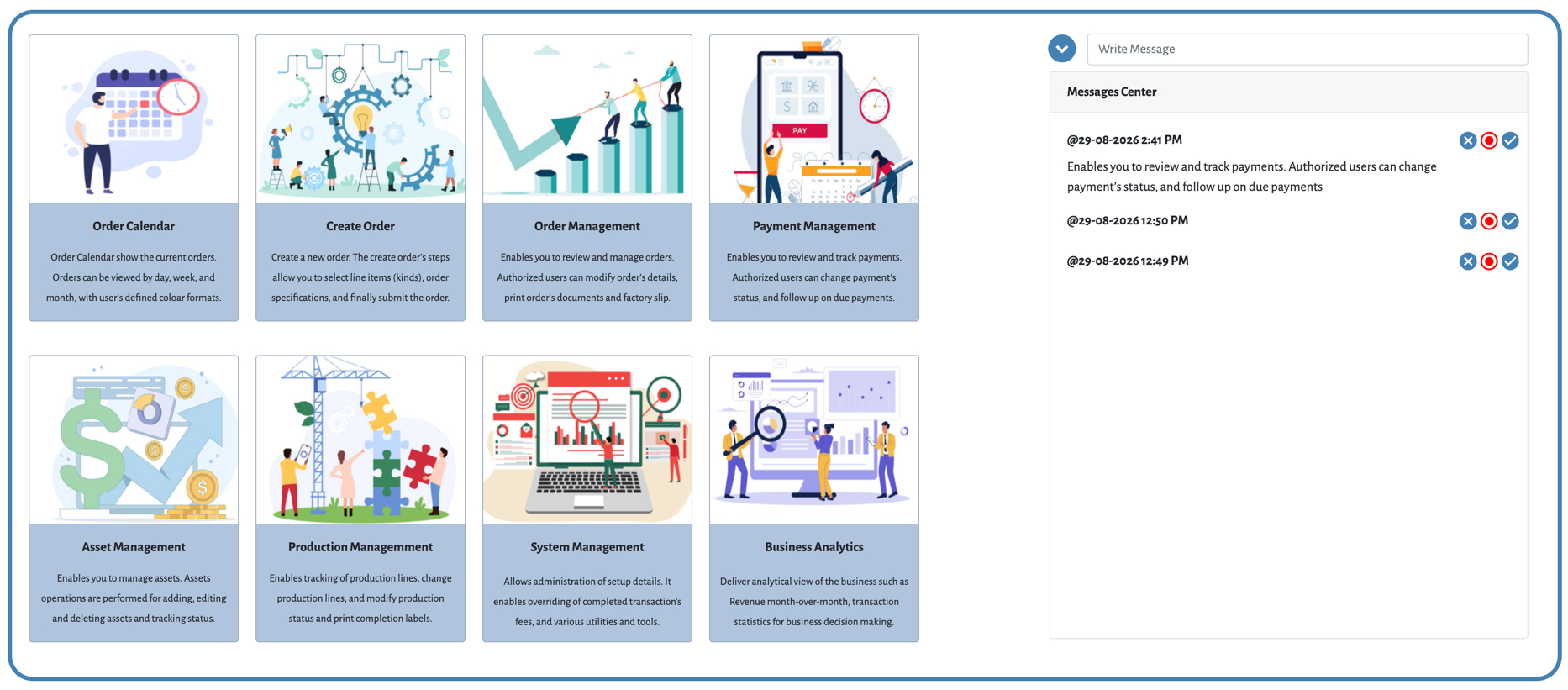
I’ve developed and deployed vPack fully using Open source software. The design supports all device types, from the desktop to the mobile as described briefly below.
vPack’s dashboard is tailored to the user's role and access rights, with administrators having full system access. A key feature is the ability to define Stock Keeping Units (SKUs), including kinds, customized offers, and assets, through a guided process or AI-powered automation.
vPack also offers advanced localization via a secure API integration with a top-tier translation platform, ensuring accurate and bi- directional translation for contacts, orders, and more.
For seamless team communication, a built-in messaging center streamlines interactions. vPack engine also send notification messages such as backup reminder, today events and more.
Core vPack features include:
- Events scheduling
- Order Management
- Contracts
- Account Receivable
- Asset Management
- Production Management
- Business Analysis
Optional add-ons are available, with pricing based on selection, supporting both business and technical needs.
Download vPack datasheet for details. If you would like to request a demo, please feel free to contact me.