LARGE LANGUAGE MODEL (LLM) for Data & AI APPLICATIONS
RETAILS
Use Case: Product Catalog Automation
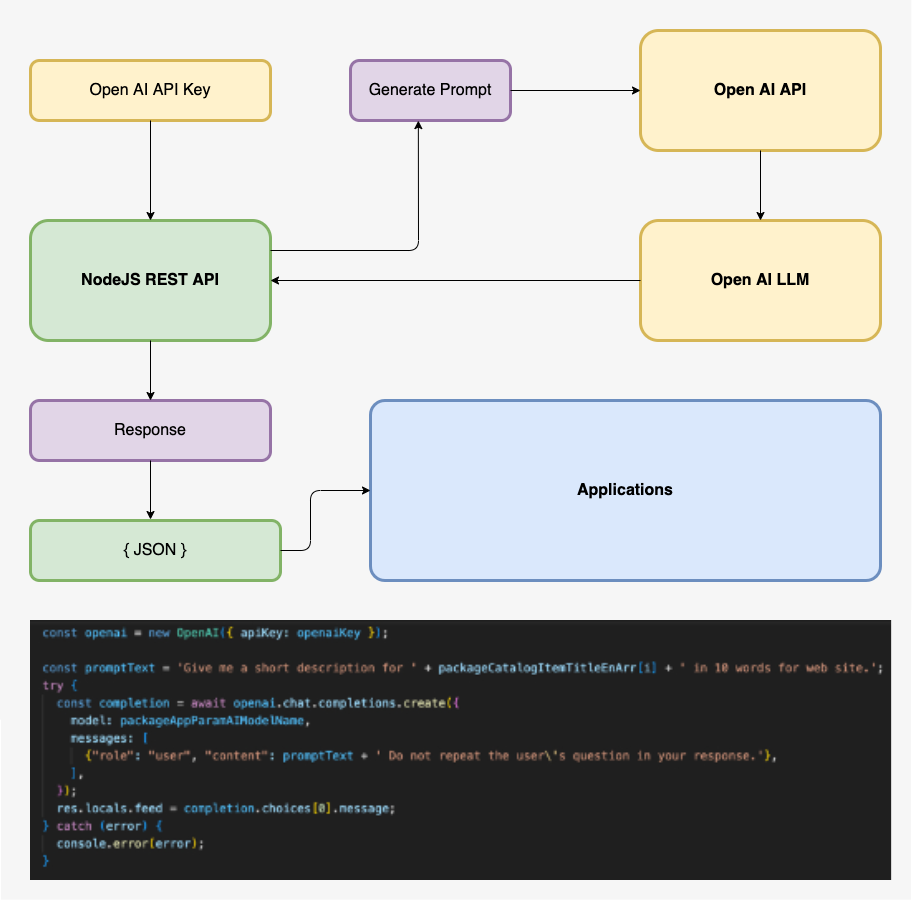
As shown in the diagram, in order to make a REST API call to OpenAI LLM, you will need an API access key, which requires a paid subscription with Open AI to obtain the key. The subscription fees and billing model reasonably uncostly.
In order to make a call from NodeJS, you will need to install the NodeJS npm package – openai. After importing openai into the NodeJS GET request, pass Open AI access to as shown below:
const openai = new OpenAI({ apiKey: openaiKey });
From within NodeJS, the first step is to generate the prompt that will be passed to Open AI LLM. Definitely the user should have the option of selecting the LLM model. Now, it’s time to make a call to Open AI LLM. The return is a promise with this array.
res.locals.feed = completion.choices[0].message;
It’s now time to form the JSON object to render the page with the return feed from Open AI LLM. The next step is to perform translation of the feed, this time we use DeepL API. To make an API call to DeepL begin by passing the key to the constructor Translator as shown below:
const DeepLAPIKey = res.locals.DeepLAPIKey;
const translator = new Translator(DeepLAPIKey);
The following translate from the default ‘US’ to ‘AR’
await translator.translateText(packageCatalogItemTitleEnArr[i], null, 'AR');
Automation of the product catalog not only reduce the massive task of entering product details, but also deliver accuracy and consistency to the product catalog metadata.